
How many times have you deleted important files permanently or emptied recycle bin, and then had a sinking feeling? I bet we all have done that at one time or other. And I’ve done that today at work.
But before hitting the panic button, I Googled few minutes and recovered the deleted files. There are many number of free applications that recover the deleted files. But here are the four notable applications that do the job very easily
1. Undelete Plus
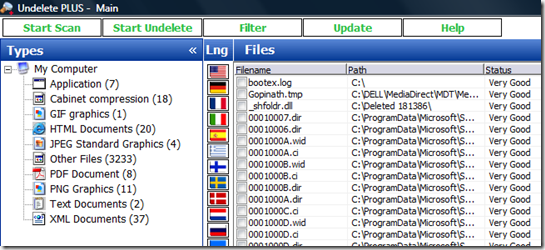
Out of all the freeware application that recovers deleted files, Undelete Plus is my choice. The user interface is very simple and straight forward. The excellent grouping and filters provided in the left side panel allows us to easily locate the beloved file to recover.
Download and Install Undelete Plus
2. Restoration
Restoration is an easy to use application that does not even required installation. You can download it and launch the executable file to scan and recover the deleted files.

3. PC Inspector File Recovery
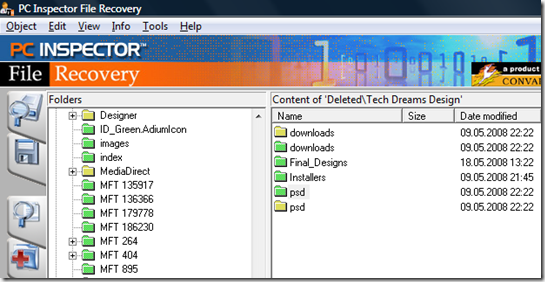
Even though the user interface of PC Inspector File Recovery is not straight forward and friendly, it is very powerful in detecting and recovering the deleted files. After scanning the drive it presents the deleted files organised as folder structure for easy navigation. From the tree structure you can navigate and choose the deleted file/folder and click on the save icon ( the second icon in the left panel) to recover them.
Download and Install PC Inspector File Recovery
4. Recuva
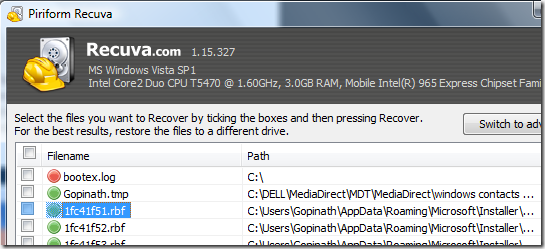
Recuva pronounced as “Recover” has a step by step wizard user interface to guide the users to locate and recover the deleted files. The basic mode interface is very simple that shows the list of deleted files that can be recovered. When you switch to advanced mode you get options to view information of the delete files and re launch the scanning operation.
Pingback: 3 Popular Services To Shorten Lengthy URLs | Tech Dreams
You missed, Undelete from road-kill.net, check it out! May I know, how to reach you Gopi?
thanks for these free softwares.
they are really good and most impotant thing is that they are free