
 Microsoft’s free XML Notepad 2007 application is a great advantage for all those who are working in the XML programming world. The tool was first introduced in the year 1998. The initial version of it was developed in C++. Later the tool is developed in C# language and its available over internet as free download software.
Every programmer definitely loves the simple and user friendly user interface of the application. Check out the list of features supported by the application and you will definitely download the application
Features Of XML Notepad
- Drag and drop: We can easily drag and drop the required content of an xml to another in no time. This functionality is supported even when we use two different instances of xml notepad
- Search: The search option in XML notepad is so posh that it takes to the most matched node or text as we keep typing the letters.
- Intellisense: Visual Studio is well known for the Intellisense support for rapid development. XML Notepad too has excellently Intellisense, which is capable populating the values based on your XSD definition. The is my favorite feature of this application.
- XSLT Transformation: When supplied with an XSLT for a particular xml, application would change the xml and displays it in a HTML viewer. This is done on clicking the "XSL output"
- XML Comparer: The tool has an in-built xml diff tool which compares two xml files and shows the difference in the GUI, which helps us in understanding the difference between the two xml files.
- Cut/Copy/Paste: XML notepad allows us to cut copy and paste the content from one node to another along with the namespace in xml format
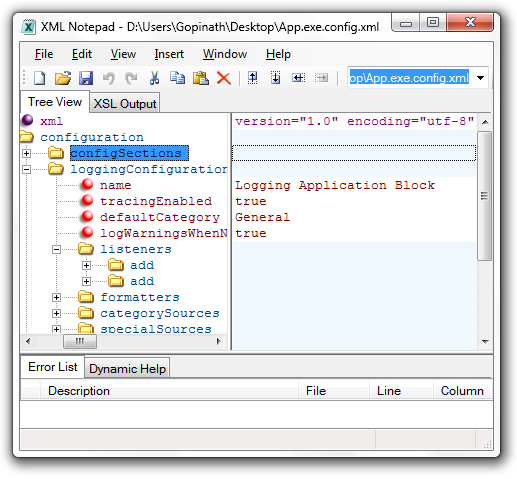
The tool is capable of loading a 3MB xml file in 1 second and is proven to be highly performing. It also provides an option of changing the font and color of the entities in the xml file which is shown on the right side pane. This property can set by using the "Options" under View menu. The tool also figures out the errors in the xml file and lists them in bottom pane. On clicking these errors, it directly takes you to the line where the error is which makes our work much easy. The features in xml notepad are very posh and reliable tool.