



To continue using Firefox I had to restore it to default settings. But I don’t like to uninstall and then install it again as it’s a time consuming process and also I’ll loose all the plugins I’m using. How did I restore the default settings in a single click?
Default Settings Restore Through Safe Mode Options
It’s very easy to restore default settings of Firefox with the safe mode options. All we need to do is
1. Close all the Firefox browser windows that are open
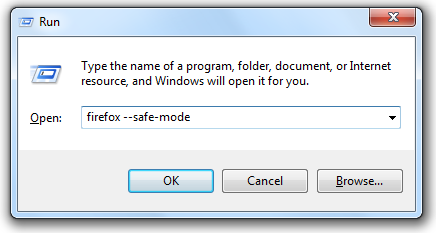
2. Launch Firefox in safe mode

3. Choose the option Reset all user preferences to Firefox defaults
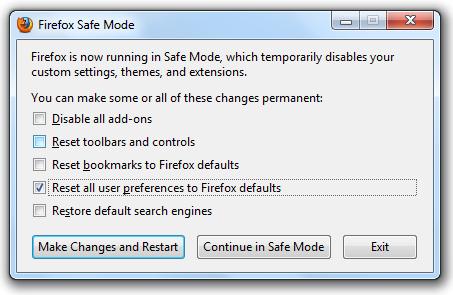

4. Click on Make Changes and Restart button.
Note: When Firefox restore the default settings, it erases all the stored passwords, browser history and other settings you have done.
That’s all. This excellent feature of Firefox saved me from great pain and hope it’s going to help you too.