
 Microsoft Outlook is undoubtedly the best Desktop email client available today for Personal Computers. Even though I've multiple mail boxes powered by GMail & Google Aps, I prefer to access work related emails using the Microsoft Outlook(with the help of Google Mail + Outlook POP3/IMAP integration).
The reason for using Outlook is very straight forward. Outlook boosts my productivity several times compared to web clients. In Outlook, Composing mails with complex objects like Images, tables layouts and attaching local files is very easy.
When a new mail arrives, Outlook displays an alert on the bottom right corner of the screen. By default email alerts are displayed only when the email is delivered to the Inbox. If you have created any rules that automatically move your mail to a different folder the desktop alerts won't show.
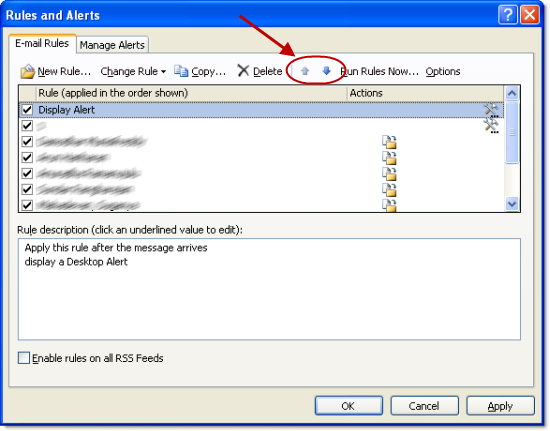
There is a workaround to beat this limitation of Microsoft Outlook and receive desktop alerts for all new mails irrespective of whether they are landing on Inbox folder or moved to custom folders. Here are the steps to be followed
Step 1: Open Outlook and go to Tools ->Rules and Alerts menu. Click on New Rule.

Step 2: Choose Check messages when they arrive available in the section Start from a blank rule and click on Next button

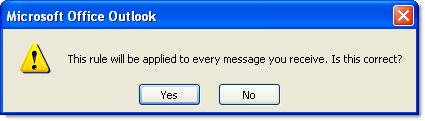
Step 3: Don't select any condition and click on Next button.
chicken houses for sale west midlands

Thanks!
Thanks a ton…!! exactly what I was looking for.
Will this work with Hotmail?
Mark Davies,
If you configure your Outlook to access Hotmail then this works. To configure Outlook for accessing hotmail check this post
This is really a gr8 info..tried so many thngs bt din knw how to get ths working..Thanks alot ..this is really useful and is working for me now!!
Great one. 10x
Really helpful
And seems lot of good stuff in your site. Subscribed to your RSS :)
thanks a lot, works for me really nice
Correction – it works… when I click on the inbox of the IMAP folder! ???
This is not working for me. I have one exchange and one IMAP mail box. The rules set up on the IMAP mail box are NOT working.
Any thoughts?
Thanks for the work around. Really helps me a lot
I have to disagree that outlook is the “best” email client but immense thanks for this post! Very helpful.
Thank you very much, you saved me a lot of time! Now I have a nice alert for each message (I added an extra sound in the rule, it looks so pro!)
Awesome!
Great, it’s exactly what I was looking for, and it’s working perfectly!
ThankQ!!!
It’s still not working. Alerts worked perfectly on my Outlook on my XP system without rules. I transfered everything to my new Vista laptop and can’t get any solutions to work. This one was one I hadn’t tried, but the alerts are still not showing up – I do get a sound however. I have checked the Tools/Options/……Advanced Email and everything is checked on. Not sure what the problem is.
nice
it is work now but when i press(send/receive ) button
not when someone send email
what can i do now??
Ah great, thank you!
Outlook is shit