
 Creating a desktop shortcut of a frequently visited web site saves you lot of time. In Firefox there is no direction menu option to create a desktop short but Internet Explorer 7.0 allows you to create one by following the menu path File->Send To-> Shortcut to Desktop. This is a traditional way. Now lets see another quick option that works in both IE and Firefox to create the desktop short cut.
- Open the browser (IE/Firefox) and browse to the page that you want to create a short cut
- Resize the browser so that you can see both desktop and browser
- Drag and drop the small icon on the left of the address bar on your desktop. The shortcut will be created.
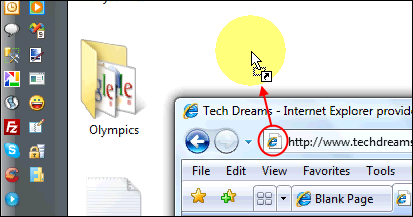
Now all you need to go to favourite website is to double click the desktop icon. You can even consider assigning a keyboard shortcut to the desktop shortcut icon to launch the favourite in much faster way.
Happy browsing!!
Nice stuff…..
Pingback: Open Gmail In 5 Different Ways | Techdows
thank you so very much. :D
I have the same… Has to be an F5 or an enter, clicking on the refresh MSIE icon doesn’t do the same. Strange :(
No one ideas?
When I open my shortcut to a website, it displays a “Page can not be displayed” page. After refrehing the page (F5 or Enter on Adressbar), the webpage is shown. Does anyone has a explanation for this??
I was looking for info on how to create a desktop shortcut for gmail, and the advertising at the top flipped down and obscured the information.
Wow thanks it actually worked and its soo easy usually stuff like this dosent work now i can do this for myspace and all my other stuff THANKS FRO HELPING APRRECIATE IT!!!
I just started using FireFox and it’s really superior, BUT their shortcut creation is tedious. I usually have several windows open and having to shrink them all is a pain. Why did they avoid the simple and effective right click short cut creation option?
I do hope they chang that … soon.
Uh, not so fast…. if you are using FireFox in Vista or Win 7 and you drag the URL to the desktop you get a FireFox icon, add five or six and you have 5 or 6 FireFox icons not individual Siticons such as with IE8 Apparently this is a bug with FireFox
Yes but how can I add a button to ,my website that a user can click to send a shortcut icon to their desktop? I found a button code on Google for it, but it doesn’t work.
Thanks, its really cool!
jwwishart, in your shortcut just add
“C:\Program Files\Internet Explorer\iexplore.exe”
before the url name e.g.
“C:\Program Files\Internet Explorer\iexplore.exe” http://www.techdreams.org (there is a space between the two)
thanks I blogged it.
Any idea how to make one that opens Specifically in IE or Specifically in FireFox… For example, I connect to Sharepoint but it really requires IE, yet FireFox is my default browser!!! Thoughts?
One more shortcut creation. cool tip.