
 To judge the authority of a web site I depend on Google Page Rank score. As Google Toolbar is not available for Google Chrome browser I was finding very tough to judge the authority of a web site while using Chrome.
To solve the problem, today I wrote a small bookmarklet that allows to check page rank of any web page in Google Chrome browser. Just drag the Google PageRank bookmarklet on to your bookmarks toolbar and click on it when ever you want to check the page rank. If your browser bookmark toolbar is hidden, please press CTRL+B to view the toolbar.
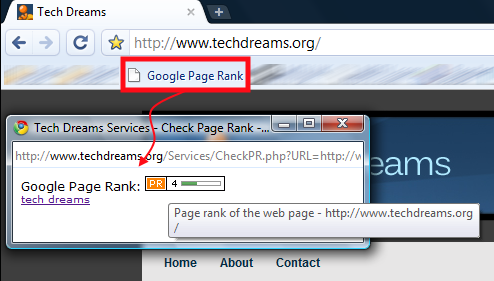
Hope this small bookmarklet enhances your Google Chrome browsing experience. Don’t forget to let me know what you think about this bookmarklet.
Drag Google PageRank Bookmarklet on to your browser bookmarks bar
Update 1: You can use this bookmarklet in Firefox as well as Internet Explorer browsers to check page rank
Update 2: You can check page rank of any web page or web site using this free Google PageRank Checking Tool
google does have this tool. i have been using it for a whole now. super usefull. cheerio
this is great. surprised google didnt have this plug in
Almost got excited….
Your code is broken. This is what I see your app’s window:
Warning: simplexml_load_string() [function.simplexml-load-string]: Entity: line 6: parser error : Opening and ending tag mismatch: hr line 5 and body in /nfs/c04/h04/mnt/69206/domains/techdreams.org/html/Services/CheckPR.php on line 59
Great tool. I was quite content with FF till recently when it just kept crashing. Got fed up and decided to switch to Chrome. Missing my PR checker and Google Bookmarks. At least now I got a PR checker…
Great tool
Great tool. I am surprised google didn’t have its own plug in
Thanks alot man,, i dont wanna use firefox never again now with google chrome,, but without the pagerank i thought i would keep with firefox,, thanks bro…
You are welcome Jay.
Thanks I have been looking for this, can’t live without Google PageRank :)
great job on the bookmarklet, one reason im not fully using chrome is because of the PR ranking, why google didnt include or built in the chrome makes me wonder?
Pingback: Opera Mini Bookmarklets Update | Wap Review
Hey man this is really cool. I can only saw WOW ;) wat a cool Plug-in (even though this not a plug-in)
Pingback: Search Engine Optimisation, tutorials, free tools,Internet Marketing, Website Promotion - SEOfocus
Great work man!
This is actually the best bookmarklet for Firefox as well. Now that my Google Toolbar doesn’t work, this comes very handy.
Thanks a lot!
Pingback: Left Of Center » Blog Archive » How To Check Google Page Rank Of a Web Page In Google Chrome Browser | Tech Dreams
krnmaq rbgcuqnv qbuphvwge ghzfi husb fxzdpn nwdmyv
Thanks its amazing I got pagerank 0.
Great – just what I’d been looking for – but it seems to give every page a rank of 0?
Thanks @Goatse
@Lion Heart,
Please press CTRL+B to view Bookmark bar if it is hidden in Google Chrome.
The service is restored now and working properly. Thank you very much for your patience. Please let us know if you find any issues.
Rohit & Rob,
For few web pages, the service is showing page rank as 0. We are trying to rectify the problem. Sorry for the inconvience.
Hmmm … how do I do that? I mean “Drag Google Page Rank on to your browser bookmarks bar” ? In my chrome browser I can not see any bookmark bar.
I think what Rob mean is (as i have the same experience like him) … your service tend to check the PageRank of the page that we visit and not the pagerank of the domain if we open page like http://www.example.com/preview.html
But this is a great service, I like it so much
Great work
@Gopinath: same as Rob. It gives page rank of zero for every page
Rob,
I verified the service again. Everything working properly. I’m able to see the page ranks of all the tested web pages properly.